
Forum tip: Always check when replies were posted. Technology evolves quickly, so some answers may not be up-to-date anymore.
-
 Bill Smyth
0I have just purchased a new computer (Windows 11). I want to use the backup plans from my previous computer (Windows 10). I do not have access to those plans. I did save the plans with my backups, but I cannot seem to find out where they are.
Bill Smyth
0I have just purchased a new computer (Windows 11). I want to use the backup plans from my previous computer (Windows 10). I do not have access to those plans. I did save the plans with my backups, but I cannot seem to find out where they are.
I have looked at some other posts. I have specifically looked here.
https://forum.msp360.com/discussion/1959/restoring-backup-plans
I go to the Online Backup Server program on my desktop. I look at each of the two backups that I did from the older computer, one to a personal External Hard Drive, and another to the Cloud (Backblaze). This has worked great for restoring data. However, I do not see the "Configuration Folder" referred to the above post. What am I doing wrong? -
 Peter Falkin
0
Peter Falkin
0
Hello Bill!
If you were using backup formats that is not marked as legacy you can restore the backup plan from the storage via clicking RMB on the name of the backup plan and selecting option Restore backup plan.
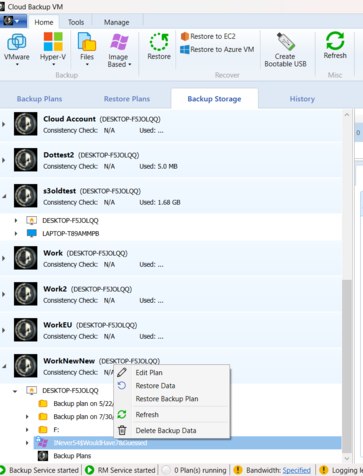
The configuration folder that was mentioned by David appears only if you are using backups that are marked as Legacy. -
Bill Smyth
0Sorry, I do not know what "clicking RMB on the name of the backup plan" means. I have tried left click, right click, enter, drill down and click all of these. I get no option that says Restore Backup Plan.
I am fairly certain that I am not using Legacy.


Welcome to MSP360 Forum!
Thank you for visiting! Please take a moment to register so that you can participate in discussions!
Categories
- MSP360 Managed Products
- Managed Backup - General
- Managed Backup Windows
- Managed Backup Mac
- Managed Backup Linux
- Managed Backup SQL Server
- Managed Backup Exchange
- Managed Backup Microsoft 365
- Managed Backup G Workspace
- RMM
- Connect (Managed)
- Deep Instinct
- CloudBerry Backup
- Backup Windows
- Backup Mac
- Backup for Linux
- Backup SQL Server
- Backup Exchange
- Connect Free/Pro (Remote Desktop)
- CloudBerry Explorer
- CloudBerry Drive
More Discussions
- Terms of Service
- Useful Hints and Tips
- Sign In
- © 2026 MSP360 Forum